
Pix Editor: AI Photo Maker
Signature EXPPhotography
4.0160.00 Reviews
- Version
- 1.4.49
- Installs
- 10.00M
- Age Rating
- Everyone
Screenshots






Our Review of Pix Editor: AI Photo Maker
 Analysis by Appyee
I find that Pix Editor: AI Photo Maker makes the most sense when I want to turn a photo into something shareable without settling into a full desktop-style editing session. It brings several familiar mobile-photo jobs together, so I can try a look, tidy the framing, or make a collage from one place. That convenience is its main appeal; it does not automatically make every result better, and I still prefer a light hand when an edit starts to look less like the moment I captured.
Where it fits in a phone-photo routine
As a photography app from Signature EXP, Pix Editor is aimed at people who want approachable tools rather than a complicated editing workflow. It is free to install, with optional in-app purchases ranging from $0.99 to $19.99 per item. I would treat that as a reason to explore the available tools first and decide later whether any paid option is worthwhile, rather than assuming every feature or asset is included at no cost.
The age rating is Everyone, and the app has a 4.4 average from around 6.8 thousand ratings, with over five million installs. Those figures suggest that it has found a sizeable audience, but they do not tell me whether its particular editing style will suit you. I would judge it by a simple test: can you get a result you like from one of your own photos without spending more time on controls than you wanted to?
A practical way to test the editing tools
For a first session, I would choose a photo with a clear subject and a reasonably uncluttered background. Try the automatic enhancement, then compare it with the untouched image before adding a filter. That order matters: if the automatic adjustment already changes the brightness or color strongly, another effect can push the image too far. I find it more useful to make one change at a time than to stack options just because they are available.
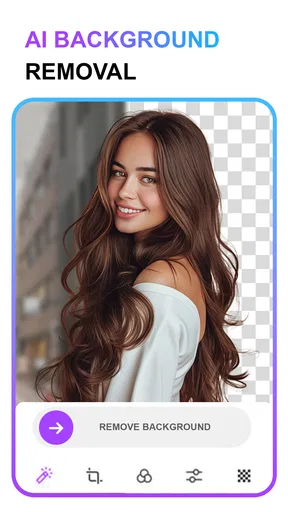
The app’s mix of editing, collage-making and background removal points to a useful advantage over a basic filter-only editor: it can handle more than one kind of small creative task. A quick portrait cleanup, a simple themed image and a collage need different decisions, though, so I would not expect one tap to produce the right finish for all of them. Background removal is especially worth checking carefully around hair, glasses and objects that overlap the subject; those edges are where automated selections tend to need a human eye.
Who is likely to enjoy it—and who may prefer another tool
I think Pix Editor is a good fit for casual creators, people who post regularly, and anyone who wants an accessible place to experiment with frames, filters and cutouts. It can also suit a small-business owner preparing a simple social post, provided the image does not need precise brand-color matching or detailed retouching. The main benefit is being able to move between several approachable editing tasks without first learning a professional interface.
If you need meticulous control over color, masks, layers or repeatable edits across a large batch of photos, I would look at a more advanced editor instead. Likewise, a dedicated collage app may be more comfortable if arranging many images and fine-tuning layouts is your main goal. Pix Editor’s range is attractive for occasional mixed use, but a specialist tool can be easier when one demanding task is all you do.
Small workflow choices that improve the result
One practical habit is to keep an untouched copy of an important original before experimenting. It gives you a clean reference and lets you decide whether a dramatic filter improves the picture or simply makes it louder. For portraits, I would also inspect the image at full size after applying effects; a thumbnail can hide rough cutout edges or details that have become overly smooth.
For a collage, I would choose the photos before opening the layout tools and look for images that share a color or a moment. That makes the finished arrangement feel intentional even if the design is simple. If you are removing a background, use a photo where the subject stands apart from it as much as possible. Clear contrast gives the selection a better chance, while a busy scene or similar colors can make cleanup more fiddly.
Unleashing Creativity with AI Magic
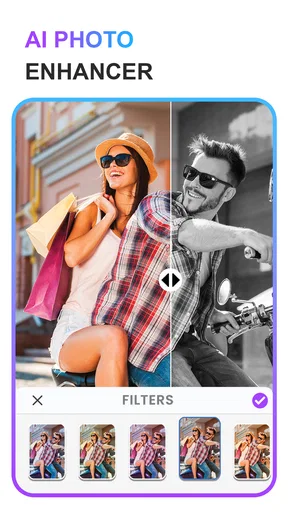
What sets Pix Editor: AI Photo Maker apart is its use of artificial intelligence. When I first launched the app, I was greeted by a sleek and user-friendly interface, which made me feel like I was about to embark on a creative journey. The app’s AI technology is a game changer, automatically enhancing photos with just a tap. It's like having a professional editor in your pocket. Seriously, the AI features are on point, transforming ordinary photos into stunning visuals.
Filters and Effects Galore
Now, if you're a fan of filters and effects, buckle up because Pix Editor offers a wide variety. I had a blast experimenting with different styles, from vintage to modern, and everything in between. The filters are not only plentiful but also uniquely crafted to give your photos a distinctive look. And the best part? You can layer them, allowing for endless creative possibilities. This truly makes the app feel like a playground for photo enthusiasts.
Editing Tools for Every Need
Aside from the AI magic, the app boasts an impressive array of editing tools. Whether you need to adjust brightness, contrast, or saturation, Pix Editor has got you covered. I found the cropping and resizing features particularly handy, especially when trying to perfect the composition of my shots. The tools are intuitive, making the editing process smooth and enjoyable, even for beginners.
Seamless Sharing and Integration
Once you've created your masterpiece, sharing it is a breeze. Pix Editor integrates seamlessly with social media platforms, allowing you to showcase your work directly from the app. I was amazed at how easy it was to upload my edited photos to Instagram and Facebook, without any hassle. This feature is a big win for me, as it saves time and effort.
Another highlight is the app’s ability to sync with cloud services. This means you can access your edited photos from any device, ensuring that your creative work is always at your fingertips. It's convenient and makes the app feel like a comprehensive editing suite.
Final Thoughts: A Must-Have for Photo Enthusiasts
In conclusion, Pix Editor: AI Photo Maker is a powerhouse of an app that combines advanced AI technology with a user-friendly interface. Whether you’re a seasoned photographer or just someone who loves to tweak photos for fun, this app offers something for everyone. It’s become a staple on my phone, and I genuinely believe it can do wonders for anyone looking to enhance their photo editing game. So why not give it a whirl and see the magic unfold for yourself?
Everyday results are easier with a clear goal
A realistic use for Pix Editor is getting a quick family or pet photo ready to share after an outing. I would start by cropping out distractions at the edge, try the automatic enhancement, and then compare a restrained filter against the original. If the photo still feels too ordinary for the occasion, a frame or a simple collage can give it a more finished presentation. The useful part is not applying every tool; it is stopping as soon as the image communicates what I want.
For a small online shop or a personal craft page, the background eraser could help isolate a product for a straightforward post. I would photograph the item against a contrasting background, check the outline closely, and avoid relying on a cutout if a clean edge is essential to the listing. This is a quick visual treatment, not a substitute for careful product photography, consistent lighting, or exact color management.
What to expect from its current version
The current version is 1.4.24, and the app was released on October 29, 2025. Those are useful reference points for understanding the product’s current state, but they do not by themselves show what changed between releases. I would not assume that a particular tool was recently added or improved without a clear change note. For someone already using it, the practical question is whether the current build still handles their usual edits comfortably and whether their preferred tools remain easy to reach.
That distinction matters because a version number can mark an iteration without telling you how the editing experience evolved. The confirmed picture is that Pix Editor is a free photography app with optional purchases and a broad mix of editing tasks. I would treat future feature changes as something to evaluate when they appear, rather than reading a release date as a promise of a specific roadmap.
Questions worth settling before you commit
Is it suitable for someone who has never edited a photo? I think so, particularly if the goal is a quick crop, a light adjustment or trying a filter. The most useful beginner habit is to compare before and after rather than trusting the first preview. That keeps the edit grounded in the original and helps you learn what each adjustment actually does.
Can it replace a professional editor? Not for every job. The range of approachable tools is convenient, but a person who needs fine-grained control, consistent processing across many images, or precise cutout cleanup will likely be happier with a specialist application. I would use Pix Editor for casual, varied tasks and choose a more capable editor when accuracy and repeatability matter more than speed.
Do I need to pay to use it? The app is free, while optional in-app purchases are listed at $0.99 to $19.99 per item. I would check the options presented in the app before building a workflow around any paid material. That way, you can decide whether the free experience covers your needs and whether an extra purchase solves a problem you actually have.
Will a cutout always look clean? I would not count on that. Hair, transparent objects, and edges that blend into the background are naturally harder to separate, so inspect the result before sharing or using it in a product image. A high-contrast source photo and a careful final check are more dependable than expecting automation to make every edge perfect.
What I would watch as I keep using it
For existing users, the best sign of a useful update would be a clearer, smoother path through the tools they already rely on, especially when moving between enhancement, filters and cutouts. I would also pay attention to whether the app keeps its simple feel as it grows: a broad feature set is valuable only if everyday edits remain quick to find and finish.
My overall view is that Pix Editor is most convincing as a flexible pocket editor for occasional creative work, not as a replacement for every photography tool. I would recommend trying it if you want one approachable place for quick enhancements, effects, collages and background removal. If you depend on exact control or a polished result that must be consistent every time, I would compare it with a specialist editor before making it part of a serious workflow.
Privacy and Permissions
See what permissions an app requests and how it handles your data.
- Photos/Media/Files
- read the contents of your USB storage, modify or delete the contents of your USB storage
- Storage
- read the contents of your USB storage, modify or delete the contents of your USB storage
- Microphone
- record audio
- Wi-Fi connection information
- view Wi-Fi connections
- Other
- view network connections, full network access, run at startup, set wallpaper, draw over other apps, control vibration, prevent device from sleeping, Google Play license check
Verdict
Strengths of Pix Editor: AI Photo Maker
- User-friendly interface for quick editing.
- AI-driven features enhance photo quality.
- Wide variety of filters and effects.
- Supports high-resolution image exports.
- Regular updates with new tools.
Limitations of Pix Editor: AI Photo Maker
- Limited free version features.
- Occasional crashes on older devices.
- In-app ads can be intrusive.
- Subscription model may be costly.
- Requires internet for AI functions.
Similar Picks in This Category
View All
Google Photos
Google LLC4.4

Gallery
Google LLC4.2

Picsart AI Photo Editor, Video
PicsArt, Inc.3.9

B612 AI Photo&Video Editor
SNOW Corporation4.1

BeautyPlus-Selfie Photo Editor
PIXOCIAL TECHNOLOGY (SINGAPORE) PTE. LTD.4.5

Remini - AI Photo Enhancer
Bending Spoons4.1
Frequently Asked Questions
What features does Pix Editor: AI Photo Maker offer?
Pix Editor: AI Photo Maker provides a wide range of features, including AI-powered editing tools, filters, and effects to enhance your photos effortlessly. It also offers tools for retouching, background removal, and creative overlays. The app is designed for both beginners and advanced users, making photo editing accessible and fun.
Is Pix Editor: AI Photo Maker free to use?
Pix Editor: AI Photo Maker offers a free version with a basic set of features. However, for access to advanced tools and additional content, a subscription or one-time purchase may be required. The app offers in-app purchases that unlock premium features, providing more flexibility in your editing projects.
Does Pix Editor: AI Photo Maker require an internet connection?
While Pix Editor: AI Photo Maker can perform basic edits offline, many of its advanced AI features and cloud-based tools require an internet connection. This ensures access to the latest updates and resources, enhancing your editing experience with real-time capabilities.
Is Pix Editor: AI Photo Maker user-friendly for beginners?
Yes, Pix Editor: AI Photo Maker is designed with a user-friendly interface that caters to both beginners and experienced users. It offers intuitive controls and guided tutorials that help newcomers understand and utilize the app’s features effectively, ensuring a smooth learning curve.
What devices are compatible with Pix Editor: AI Photo Maker?
Pix Editor: AI Photo Maker is available for both Android and iOS devices. It supports a wide range of smartphones and tablets, ensuring compatibility with most modern devices. Regular updates ensure that the app remains optimized for newer models and operating system versions.
